XXL Prompt Manager
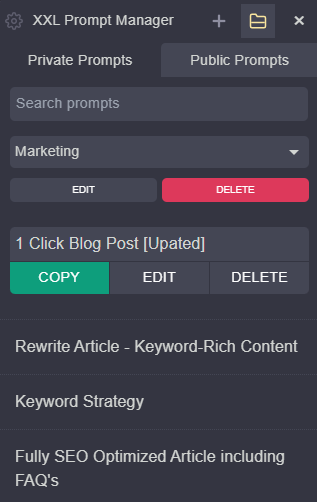
Save, Edit, and Copy prompt templates in 1-Click for OpenAI ChatGPT, Claude, Gemini, Perplexity, Grok, Meta AI, Copilot, Deepseek, Kimi, Mistral and Qwen!
Free & Unlimited
Save, Edit, and Copy prompt templates in 1-Click for OpenAI ChatGPT, Claude, Gemini, Perplexity, Grok, Meta AI, Copilot, Deepseek, Kimi, Mistral and Qwen!
Free & Unlimited
Changelog 1.4.7
NEW Draggable Icon
- Drag the floating icon up or down to reposition it
- Position is saved and remembered across sessions
NEW Collapsible Search
- Click the search icon (🔍) in the header to show/hide search
- Press 'Ctrl+F' or '⌘+F' to toggle search (when sidebar is open)
Keyboard Shortcuts
- Press 'Alt+P' (Changed from Ctrl+Alt+P) to quickly open/close the sidebar
- Press 'Escape' to close the sidebar
- Keyboard shortcuts now shown in Settings
UX Improvements
- Renamed header to "Prompt XXL" for a cleaner look
- Simplified interface (tabs hidden for now)
- macOS support with proper ⌘ and ⌥ key symbols
Bug Fixes
- Fixed icon disappearing on ChatGPT and other single-page apps
- Fixed keyboard shortcut conflict with browser's print dialog
- Updated all external links to HTTPS
Changelog 1.4.6
NEW Keyboard Shortcuts
- Press 'Ctrl+Shift+P' to quickly open/close the sidebar
- Press 'Escape' to close the sidebar
- Press 'Ctrl+F' to focus the search (when sidebar is open)
UX Improvements
- 'Expand All' button that open/closes the prompt expansion on all prompts at once
- Sort prompts by Newest, Oldest, A-Z, Z-A
- Folder dropdown now appears above prompt content when editing for better visibility
Bug Fixes
- Fixed clipboard functionality for better browser compatibility
- Fixed localization issues in multiple languages
Performance & Stability
- Improved error handling
- Better input validation for prompts and folders
- General code optimizations
Changelog 1.4.5
- Added DeepSeek, Kimi, Qwen and Mistral Chat Integration
- Added Italian, Turkish and Korean language translations
Changelog 1.4.4
- Added Russian, Mandarin Chinese, Hindi, Portuguese, Indonesian, Japanese, Vietnamese language translations
Changelog 1.4.3
- NEW: Prompt Variables with [Placeholder]
- NEW: Import Prompts from CSV file (UTF-8)
- NEW: Support and Share Button Link under Settings
- NEW: Spanish and French Language Translation
- NEW: Show or Hide Icon on LLMs Websites
- General Improvements and UX Enhancement
Changelog 1.4.2
- NEW Icon for adding prompts (in header)
- NEW Icon for adding folders (in header)
- NEW German Language (Translation)
- Improved folder behavior (edit/delete)
- Design changes / UX enhancements
Changelog 1.4.1
- NEW: Add, edit and delete folders
- NEW: Assign prompt to folder
- NEW: Integration on Grok and Meta AI
- NEW: Folders in CSV export
- FIX: Several Design & UX improvements
Changelog 1.4
- Rebranding to XXL Prompt Manager to reflect the use of multiple LLM AI Models
- Improved UX with only showing the prompt title (click at title will reveal the prompt)
- Added and JavaScript support in prompts
- General adjustments and improvements
- Fixed export function
Changelog 1.3.2
- Notification for Re-Enabling the Extension after Updates
Changelog 1.3.1
- URL fix for ChatGPT and Gemini (Bard)
- Add of Perplexity
Changelog 1.3
- New Icon to access the Prompt Manager on Bard and Bing Chat
- New Tab for upcoming 3000+ Public Prompts
- Add Settings ⚙️ to Export Prompts as CSV
- Add Settings ⚙️ to Rate Extension
- Fixed icon position for hiding share conversation on ChatGPT
ChatGPT Prompt Manager 1.2
- Add Title Field: Give prompts a title for better organization and search results
- Add max-height for prompts in sidebar for better Usability
- Add mouse-hover over prompts to see full text of prompt
- Add indicator / ellipsis for longer prompts
- Add search field erase button (remove text in 1-click)
ChatGPT Prompt Manager 1.1
- New Icon for ChatGPT Prompt Manager
- Icon now visible on chat.openai.com/chat for easier access to prompts
- Saving method change from chrome.storage.sync to chrome.storage.local to handle storage space limitations
- Migration of prompts to new saving method
Save, Edit, and Copy prompt templates in 1-Click for OpenAI ChatGPT, Claude, Gemini, Perplexity, Grok, Meta AI, Copilot, Deepseek, Kimi, Mistral and Qwen!
Free & Unlimited
